


CamHipro
3.2678.00 Reviews
App Specs
- Version
- 3.1.80
- Updated On
- License
- Free
- Downloads
- 1,000,000+
- Developer
- franck
- Categories
- Video Players & Editors
- Platform
- Android, iOS
Screenshots
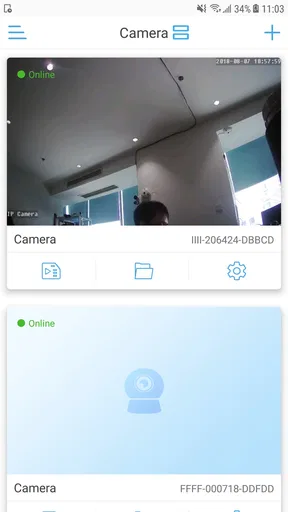
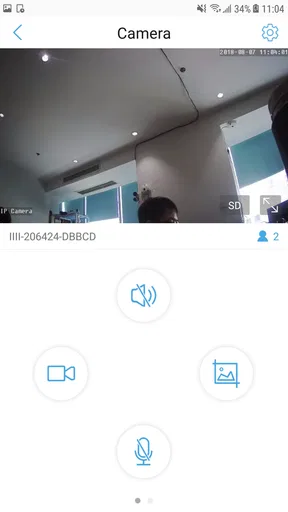
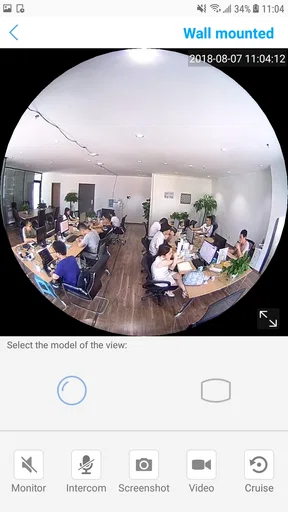
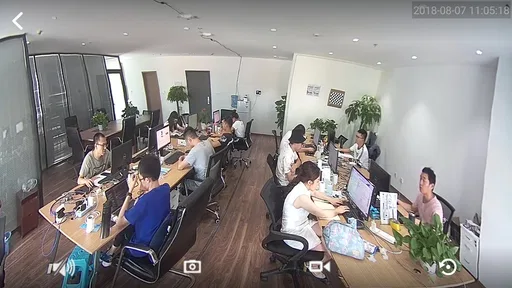
 Analysis by AppCompare
When I consider a phone-based camera monitor, I start with a practical question: will it fit the cameras and routine I already have, and will I actually check it when I’m away? CamHipro is a security-monitoring app rather than a general video editor or a replacement for a camera. Its appeal is the chance to watch a compatible setup from a mobile device; its usefulness depends on whether that setup suits your needs and whether the app’s ongoing costs make sense to you.
What the free price does—and doesn’t—tell you
CamHipro is free to download, which makes trying the app less of a financial commitment than starting with a paid camera-monitoring app. There are also in-app purchases, with listed items ranging from $4.99 to $99.99. I would treat those as a reason to check the purchase details before paying, not as proof that any particular monitoring function requires a subscription or that every user will need an upgrade.
The distinction matters: free access can make sense for someone who already owns compatible cameras, while the total cost of a home-monitoring setup may include hardware or optional purchases beyond the app itself. I wouldn’t buy cameras on the assumption that the app alone guarantees a complete security system. First check that the cameras you intend to use work with it, then decide whether the app’s actual functions meet your routine before spending anything.
Where it can earn a place in your routine
For a person who wants to check a camera feed while away, a dedicated monitor has a more focused job than a typical video player. The category is Video Players & Editors, but the app’s security-monitoring purpose is what matters in practice: you are looking at a camera view, not organizing or editing clips. The developer is franck, and CamHipro has been available since August 7, 2018. Its current version is 3.1.80, and it runs on Android 5.0 or later.
That makes it a more relevant option for an existing camera owner than for someone simply looking for a general-purpose camera app. If you’re setting up a monitor for a front entry, for example, a quick glance at the feed can help you check whether a delivery is there. A camera app can make that check convenient, but it is not the same as having someone respond to an incident or guarantee that every alert will be acted on.
How I’d judge its value against alternatives
Compared with the usual alternatives, the main choice is between a dedicated camera app, the app recommended for a camera brand, and a broader smart-home platform. A dedicated app may be the simpler route when it supports the cameras you already own. A manufacturer’s app may be the safer starting point when compatibility is uncertain, while a wider platform may suit someone who wants camera viewing alongside other connected devices. I wouldn’t assume CamHipro is automatically the best fit just because it is free to download.
One useful way to avoid a frustrating setup is to test the workflow in stages: confirm that the camera can be added, open the live view on the phone you plan to use, and check whether the controls are understandable before relying on it away from home. If more than one person needs access, consider how each person will use the setup and whether the app’s account and sharing arrangements suit your household. Those practical checks are more valuable than choosing on the basis of a long feature list.
Worth Reading Before You Choose

EA SPORTS FC Mobile 26 Is a Bigger Football Game, but It Takes Time

Flipboard Shows What News Apps Must Do Beyond the Feed

Switching to Android Auto Means Rethinking Your Driving Routine

Google Calendar Makes a Crowded Week Easier to Manage

Ludo King Makes the Most of the Minutes Between Plans

Baby Panda World Brings Quick Play to Modern Phones, but Its Game Library Feels Busy
Who should give it a closer look
I’d consider CamHipro if you already have a compatible camera, want to monitor a home or small workspace from your phone, and are comfortable checking settings yourself. It may also suit someone who wants to see a camera view now and then rather than manage a complex collection of connected equipment. Its age rating is Everyone, but that is a content classification, not a guarantee that the app will match every user’s technical comfort or privacy expectations.
I’d be more cautious if you need a camera system with clearly defined support, a straightforward way to manage several household members, or a firm understanding of recurring costs before setup. In those cases, compare the manufacturer’s own app and any paid alternatives before committing. If you have no camera yet, choose the hardware and its compatibility first; downloading a monitoring app alone won’t give you a working camera feed.
CamHipro has an average rating of 3.2 from around 8,200 ratings, with about 678 written reviews, and it has been installed over a million times. I read those figures as a reason to approach it with realistic expectations rather than as a verdict on how it will work with a particular camera. A large number of installs can indicate that people have tried it, but a smooth experience still depends on the equipment and the way you plan to use it.
In everyday use, I’d also think through what happens when I’m busy or offline. A notification is only useful if it reaches the right person at a useful time, and checking a live feed is not a substitute for reviewing how the camera itself is positioned. Before relying on any phone-based monitor, I’d test the view at different times of day, make sure the camera covers the area I care about, and decide who will check alerts when I cannot.
The app is therefore best viewed as one part of a monitoring arrangement, not a complete security promise. I’d avoid pointing a camera at places where people expect privacy, and I’d be thoughtful about who can access its view. Those considerations apply especially when a camera covers a shared entrance or workspace: a useful view should not come at the expense of other people’s privacy.
If your main question is whether it costs anything to try, the download is free. If your question is whether all useful monitoring is free, the in-app purchase range means you should inspect the purchase screen and decide based on the functions you actually want. I wouldn’t assume that an optional item is essential, nor would I budget for a specific paid feature without checking what it offers in the app.
CamHipro is not the choice I’d make for editing videos, browsing a media library, or building a general entertainment setup. Its purpose is narrower: camera monitoring. That focus can be an advantage when all you need is a way to check a compatible camera, but it is a limitation if you want one app to organize many kinds of video or to control a broader smart-home system.
Getting Started with CamHipro
First things first, downloading CamHipro is a breeze. Available on both Android and iOS, you can find it easily on the respective app stores. The setup process is straightforward, and before you know it, you'll have your cameras synced and ready to go. The interface is pretty user-friendly, which is something I always appreciate. Even if you’re not particularly tech-savvy, you’ll have no trouble navigating your way around.
Features That Stand Out
One of the standout features of CamHipro is the live streaming capability. You can watch what’s happening in real-time, which is perfect for those moments when you just need to check in quickly. Additionally, the app supports multiple cameras, so whether you have one or a dozen, you’re covered.
Another feature that I found incredibly useful is the motion detection. The app sends notifications whenever it detects movement, allowing you to react promptly. This is a game-changer for anyone who wants to keep their home secure or just wants to know when their package arrives.
Customization and Alerts
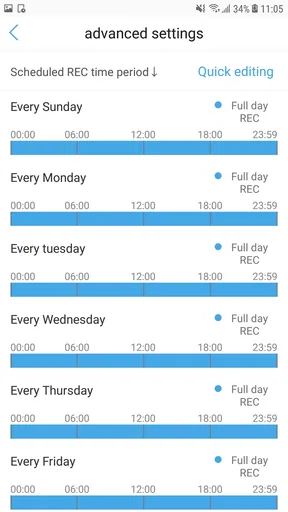
The app allows for a good degree of customization. You can adjust the sensitivity of the motion detection, set specific areas to monitor, and even schedule when you want the alerts to be active. The alert system is reliable, pinging your phone with a notification that’s hard to miss.
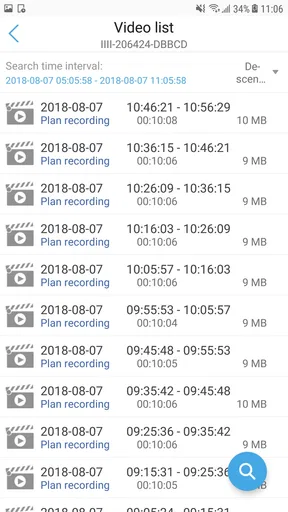
On top of that, there’s an option to store footage either locally or in the cloud. If you’re someone who values having a backup, the cloud storage is a neat addition. It ensures you can access important footage even if something happens to your device.
Video Quality and Performance
Now, let’s talk about video quality. The app supports high-definition streaming, so you’re not stuck squinting at blurry footage. The clarity is impressive, and there’s minimal lag, which is crucial when you’re monitoring live feeds. It’s clear the developers put a lot of thought into ensuring the app performs smoothly.
User Experience
The overall user experience with CamHipro is quite pleasant. Navigating through the app feels intuitive, and the response time is snappy. I didn’t encounter any major bugs or crashes, which is always a plus. Plus, the app's design is sleek and modern, making it a joy to use.
If you ever get stuck, there’s a helpful FAQ section within the app that covers most of the bases. However, I found the app to be quite self-explanatory, so you might not need it much.
Final Thoughts
Overall, CamHipro is a solid choice for anyone looking to enhance their home security setup. With its rich feature set, ease of use, and reliable performance, it ticks all the right boxes. Whether you’re using it to keep an eye on your home, office, or any other space, it delivers peace of mind.
So, if you’re on the hunt for a security app that’s both powerful and easy to use, give CamHipro a shot. It’s like having a security guard in your pocket, ready to alert you at a moment’s notice. What more could you ask for?
My buy-or-skip verdict
I’d try CamHipro when I already had a camera I wanted to monitor and could verify that it worked with the app. Free access makes that first step appealing, while the paid items are a reason to make a deliberate choice rather than tap through a purchase without checking. If I needed predictable support, a particularly polished shared-home setup, or a clear all-in cost before choosing equipment, I’d compare other options first.
For someone who simply wants to check a compatible camera feed during the day, the app’s focused role may be enough. For someone expecting a complete security service, guaranteed response, or a universal camera solution, it would be better to look beyond the app and evaluate the whole setup. That is the trade-off I’d keep in mind: CamHipro can be useful as a phone-based way to monitor cameras, but the value comes from how well it fits the cameras and habits you already have.
Pros
- User-friendly interface for easy navigation.
- Supports high-quality video streaming.
- Real-time alerts for enhanced security.
- Multiple device support for convenience.
- Customizable settings for user preferences.
Cons
- Occasional connectivity issues reported.
- Limited cloud storage options.
- Subscription required for advanced features.
- In-app ads can be intrusive at times.
- Requires a stable internet connection.
FAQs for CamHipro
What is CamHipro and what are its main features?
CamHipro is a versatile camera application designed for remote surveillance. It allows users to connect and monitor IP cameras from their mobile devices. Main features include real-time video streaming, motion detection alerts, and a user-friendly interface that supports multiple camera connections simultaneously, ensuring comprehensive security monitoring.
Is CamHipro compatible with all IP cameras?
CamHipro supports a wide range of IP cameras, but compatibility can vary depending on the camera model and manufacturer. It is recommended to check the app's compatibility list or consult the camera's documentation to ensure seamless integration and functionality with the app.
How user-friendly is the CamHipro app for beginners?
CamHipro is designed with an intuitive interface that caters to both beginners and advanced users. The app provides easy setup instructions, and the dashboard is straightforward, allowing users to quickly access camera feeds and adjust settings without a steep learning curve. This makes it accessible for users new to surveillance apps.
Are there any subscription fees or in-app purchases required?
CamHipro is generally free to download and use, but some advanced features may require in-app purchases or subscriptions. Users should review the app's pricing details in the app store to understand any potential costs associated with premium features or additional functionalities.
How secure is the CamHipro app in terms of data privacy?
CamHipro prioritizes user privacy and data security by implementing encryption protocols for data transmission. However, users are encouraged to regularly update the app and their devices to the latest security patches and to use strong, unique passwords for their accounts to enhance security further.


